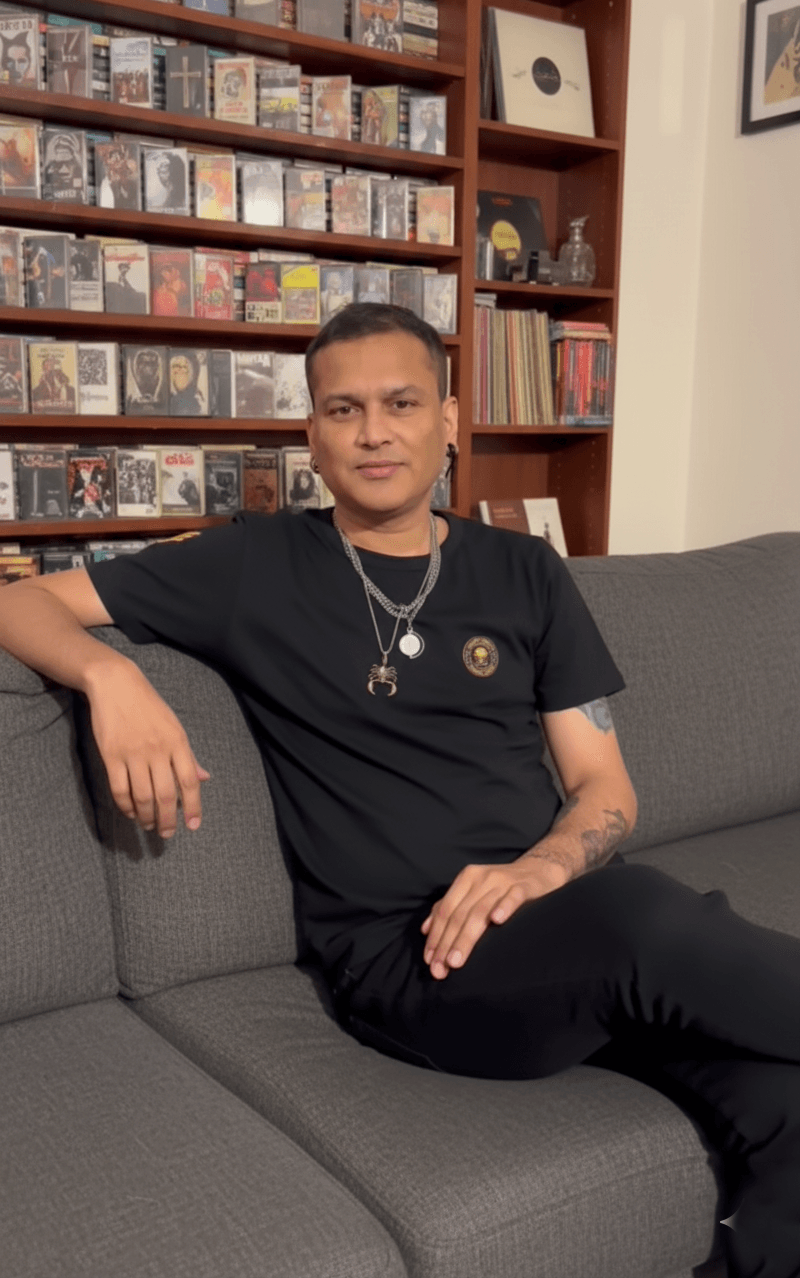
If you’re from the Northeast, you know this feeling — Zubeen Da isn’t just a singer; he’s an emotion. His songs have been the background of our best days, late-night thoughts, and every broken or happy heart. Like so many fans, I’ve always dreamed of having a photo with Zubeen Da — just a simple, genuine moment captured forever.
And finally, with a bit of love and the magic of Gemini AI, I made that dream come true using Zubeen Da AI Photo Prompt.
This isn’t just another AI experiment. It’s something personal. So today, I’m sharing how I created a 100% realistic photo with Zubeen Da using AI, so every fan like me can do it too. 💚
Before & After — From Dream to Reality


- Zubeen Da’s original couch photo. I will add below.
- The generated AI photo with both of us sitting together — perfectly natural, realistic lighting, and a genuine smile
It’s incredible how AI can turn a heartfelt wish into a lifelike memory.
If you want the same style photo I use for my reference image, check this blog “Turn Your Photo into a Luminous Warm Backlit Studio Portrait“
What is the Zubeen Da AI Photo Prompt?
The Zubeen Da AI Photo Prompt is your secret tool to create a moment with him that feels real. It guides the AI to combine your photo with Zubeen Da’s in a way that feels natural and cinematic.
No weird blends, no fake faces — just pure realism, warmth, and that emotional connection every fan has imagined.
Step-by-Step Guide to Create Your Own Photo
- Visit Google AI Studio (Gemini Nano Banana)
- Upload Zubeen Da’s Photo
I already added the photo of Zubeen da below. First Download it. - Upload Your Photo
Pick a well-lit image with a matching angle and posture. - Paste the Prompt (below)
Copy it exactly — it ensures realistic alignment, lighting, and face matching. - Generate Your Image Using Gemini Nano Banana
Let the AI process your photos. It might take a few seconds — but the result is worth every heartbeat. 💚 - Download and Save Your Masterpiece
You’ll have a photo that feels straight out of a personal memory.

When I first saw the output, it honestly felt emotional.
For a second, I forgot it was AI — it looked that real.
Download Zubeen Da’s Couch Photo
Before you begin creating your own “Zubeen Da AI Photo,” you’ll need the original couch image of Zubeen Da.
This is the same reference I used to make my realistic AI photo — it helps Gemini perfectly align lighting, pose, and background.
Zubeen Da Couch Photo (Reference Image)
(Click below to download)

Prompt for Boys:
Use the two uploaded reference images only.
Reference Image 1: The person already sitting on the couch and the room environment.
Reference Image 2: My face and identity.
Maintain 100% exact face match for my reference image. Preserve my hairstyle, hairline, beard, skin tone, facial proportions, natural expression, and every unique facial feature with no alteration. Do not beautify, reshape, smooth the skin, or reinterpret the face.
Keep the original couch, room, lighting, background, camera angle, perspective, and composition from the first image completely unchanged. Naturally add me sitting beside the existing person on the same couch, ensuring both subjects are positioned realistically with proper spacing and natural body proportions.
Dress me in a plain black rock-style oversized T-shirt and blue jeans. I should have a slightly happy, confident expression, sitting comfortably with a relaxed posture. Ensure my body angle, eye level, and pose match the perspective of the existing person so it appears both of us were photographed together.
Match the lighting direction, shadows, skin tones, white balance, reflections, and depth perfectly between both people. Blend the clothing, skin, and surroundings seamlessly so there are no mismatched angles, lighting inconsistencies, or visible editing artifacts.
The final image should look like a genuine smartphone photo of two people sitting together on the same couch, naturally captured in a single shot with authentic colors, realistic textures, and a completely seamless integration.Note: If you want a different outfit, change it in the prompt and remove the outfit description to keep the original dress from your reference image.
Prompt for Girls:
Use the two uploaded reference images only.
Reference Image 1: The original photo containing the person sitting on the couch and the complete room environment.
Reference Image 2: My face and identity.
Maintain 100% exact face match from my reference image. Preserve my exact facial features, face angle, hairstyle, hairline, beard, skin tone, facial proportions, expression, and every unique facial characteristic with no alteration. Do not beautify, reshape, smooth the skin, or reinterpret my face.
Keep the original couch, room, background, furniture, lighting, camera angle, perspective, composition, and the existing person exactly as they are. Naturally add me sitting beside the existing person on the same couch, matching the seating height, body angle, posture, and distance so it appears we were photographed together.
My face must match the lighting and viewing angle of the original scene perfectly. Ensure the facial alignment, head position, eye level, shadows, highlights, skin tones, reflections, and perspective are consistent with the existing person. There should be no mismatched angles, lighting differences, or editing artifacts.
Blend my clothing, body, and surroundings seamlessly with the original image while preserving natural proportions and realistic contact with the couch. Both subjects should share the same atmosphere, depth, focus, and environmental lighting.
The final result should look like a single genuine smartphone photo captured in one moment, with completely natural integration, authentic colors, realistic textures, and no visible signs of editing or AI generation.
Why This Prompt Is Special
This isn’t just a “photo edit.”
It’s something fans can cherish — a blend of memory and imagination.
The AI doesn’t just create a fake image; it creates a moment that feels alive.
Every detail — the shadows, lighting, and expressions — feels authentic, almost cinematic.
So, if you’ve ever wished for a picture with Zubeen Da, this prompt is your small dream come true.
Related Prompts You Might Love
- Create Your Photo with Zubeen Garg using AI Prompt
- Prompt for Selfie with Celebrity: Turn Any Photo Into a Viral selfie
- Girl Mirror Selfie Prompt
Use Cases
- Save the moment in your heart forever.
- Social-media tributes
- Personalized digital posters
- Fan art & AI edits
- Tribute content creation
Final Words
Because when love meets technology, even impossible dreams look real.
This isn’t just an AI experiment; it’s a moment every Zubeen Da fan deserves to feel.
“For one frame, it felt like I was sitting beside my idol — and that’s the power of AI and love combined.”