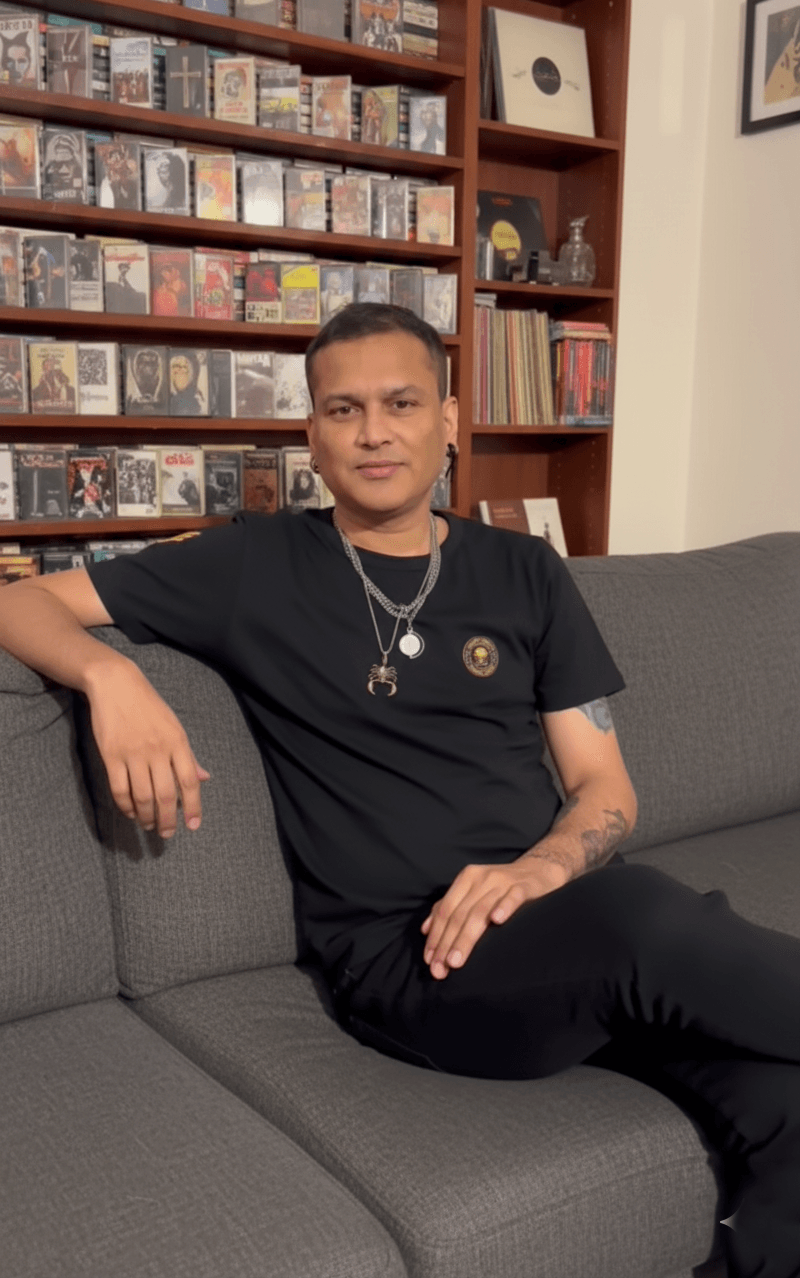
If you’re from the Northeast, you know this feeling — Zubeen Da isn’t just a singer; he’s an emotion. His songs have been the background of our best days, late-night thoughts, and every broken or happy heart. Like so many fans, I’ve always dreamed of having a photo with Zubeen Da — just a simple, genuine moment captured forever.
And finally, with a bit of love and the magic of Gemini AI, I made that dream come true using Zubeen Da AI Photo Prompt.
This isn’t just another AI experiment. It’s something personal. So today, I’m sharing how I created a 100% realistic photo with Zubeen Da using AI, so every fan like me can do it too. 💚
Before & After — From Dream to Reality


- Zubeen Da’s original couch photo. I will add below.
- The generated AI photo with both of us sitting together — perfectly natural, realistic lighting, and a genuine smile
It’s incredible how AI can turn a heartfelt wish into a lifelike memory.
If you want the same style photo I use for my reference image, check this blog “Turn Your Photo into a Luminous Warm Backlit Studio Portrait“
What is the Zubeen Da AI Photo Prompt?
The Zubeen Da AI Photo Prompt is your secret tool to create a moment with him that feels real. It guides the AI to combine your photo with Zubeen Da’s in a way that feels natural and cinematic.
No weird blends, no fake faces — just pure realism, warmth, and that emotional connection every fan has imagined.
Step-by-Step Guide to Create Your Own Photo
- Visit Google AI Studio (Gemini Nano Banana)
- Upload Zubeen Da’s Photo
I already added the photo of Zubeen da below. First Download it. - Upload Your Photo
Pick a well-lit image with a matching angle and posture. - Paste the Prompt (below)
Copy it exactly — it ensures realistic alignment, lighting, and face matching. - Generate Your Image Using Gemini Nano Banana
Let the AI process your photos. It might take a few seconds — but the result is worth every heartbeat. 💚 - Download and Save Your Masterpiece
You’ll have a photo that feels straight out of a personal memory.

When I first saw the output, it honestly felt emotional.
For a second, I forgot it was AI — it looked that real.
Download Zubeen Da’s Couch Photo
Before you begin creating your own “Zubeen Da AI Photo,” you’ll need the original couch image of Zubeen Da.
This is the same reference I used to make my realistic AI photo — it helps Gemini perfectly align lighting, pose, and background.
Zubeen Da Couch Photo (Reference Image)
(Click below to download)

Prompt for Boys:
Combine the two reference images — one of a person sitting on a couch and one of me — and place me naturally sitting beside the other person on the same couch. Make sure the facial alignment, lighting, and perspective are perfectly matched for 100% realistic face accuracy and natural proportions. Preserve my exact facial features and expression slightly happy and confident, ensuring no distortion or mismatched angles. Change my outfit to a black rock-style T-shirt and blue jeans. Maintain a cohesive, realistic look where both people share the same lighting, shadows, and atmosphere. The final image should look like a genuine photo taken together, with ultra-realistic detail, consistent skin tones, and natural posture. Note: If you want a different outfit, change it in the prompt and remove the outfit description to keep the original dress from your reference image.
Prompt for Girls:
Combine the two reference images — one of a person sitting on a couch and one of me — and place me naturally sitting beside the other person on the same couch. Make sure the facial alignment, lighting, and perspective are perfectly matched for 100% realistic face accuracy and natural proportions. Preserve my exact facial features, angle and expression , ensuring no distortion or mismatched angles. Maintain a cohesive, realistic look where both people share the same lighting in faces, shadows, and atmosphere. The final image should look like a genuine photo taken together, with ultra-realistic detail, consistent skin tones, and natural posture.Why This Prompt Is Special
This isn’t just a “photo edit.”
It’s something fans can cherish — a blend of memory and imagination.
The AI doesn’t just create a fake image; it creates a moment that feels alive.
Every detail — the shadows, lighting, and expressions — feels authentic, almost cinematic.
So, if you’ve ever wished for a picture with Zubeen Da, this prompt is your small dream come true.
Related Prompts You Might Love
- Create Your Photo with Zubeen Garg using AI Prompt
- Prompt for Selfie with Celebrity: Turn Any Photo Into a Viral selfie
- Girl Mirror Selfie Prompt
Use Cases
- Save the moment in your heart forever.
- Social-media tributes
- Personalized digital posters
- Fan art & AI edits
- Tribute content creation
Final Words
Because when love meets technology, even impossible dreams look real.
This isn’t just an AI experiment; it’s a moment every Zubeen Da fan deserves to feel.
“For one frame, it felt like I was sitting beside my idol — and that’s the power of AI and love combined.”